One Last SecondDay One
One of these apps is built to capture everything about a day. The other asks which three seconds were worth keeping.
Download on the App Store→Where Day One shines
Paul Mayne built Day One in 2011 because he wanted a private, beautiful place for his own memories — and the craft showed from the start: Mac App of the Year in 2012, an Apple Design Award in 2014, more than fifteen million downloads, over two hundred thousand five-star ratings. For a lot of people, “journaling app” simply means Day One, and that reputation is earned.
It has the archive question answered, too. Since 2021 Day One has been part of Automattic — the company behind WordPress.com and Tumblr, which has kept software alive for two decades — and a journal is exactly that kind of bet: decades long, on whoever keeps the tool running. The privacy story is genuinely strong — end-to-end encryption validated by an independent security audit, and a plain no-selling-your-data policy. It runs everywhere (iPhone, iPad, Android, Mac, Windows, Apple Watch, the web) and takes everything: writing, photos, video, audio, drawings, scanned pages, even the weather and your step count. If what you want is a journal for your whole life, Day One is the one to beat — and we’d rather you keep your days with them than not keep them at all.
Where we part ways
It starts from a different question
Day One’s question is “how much of your life can you keep?” — a journal for life, with room for all of it. One Last Second starts from memento mori — remember you will die — not as a warning, but as a way of seeing. Every day opens with a quote in that tradition, your life renders as 4,160 weeks, and the question is never “what happened today?” It’s “what was worth keeping?”
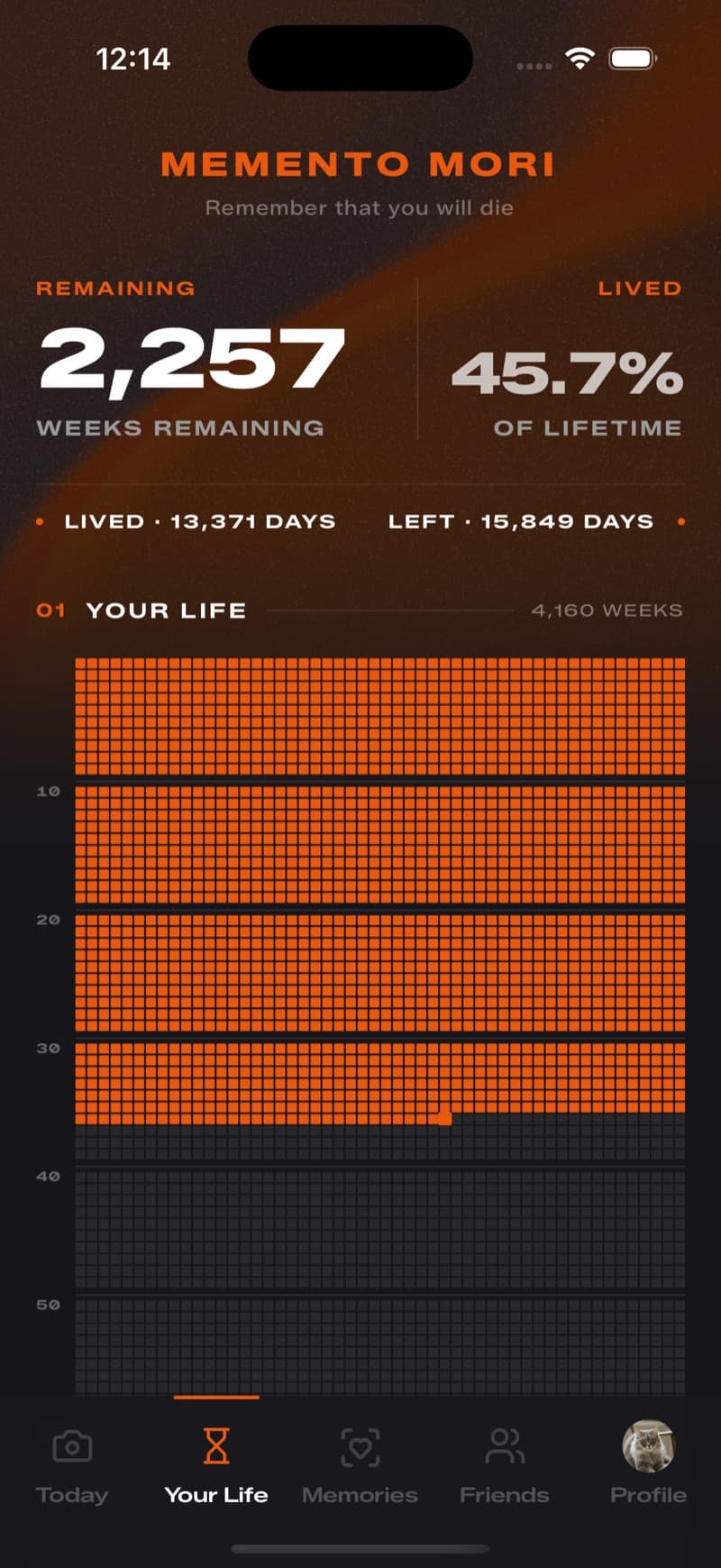
The Life tab — your life in weeks, in the app.
One moment, not everything
Day One will take everything you can hand it — writing, thirty photos and videos in a single entry, audio, sketches, the weather, your step count. For a journal, that’s exactly right: capture more, preserve more. Our bet runs the other way. Three seconds, once a day, and nothing else — because when you can’t keep everything, you have to look at your day and choose. The choosing is the practice.
They capture the day. You choose the second.
Sealed, not editable
A journal should be editable — rereading and revising is half the point, and Day One rightly lets you rewrite any entry and fill any past date. We made the opposite promise: at midnight, the day seals. No rewrites, no backfilling — a day stays open for 48 hours for the nights you fall asleep first, and then it seals like everything else. A journal you can revise forever tells the story you settled on. A sealed archive keeps what you actually noticed, on the day it happened.
No streaks, on purpose
Day One is proud of streaks — the calendar view, the momentum, members thousands of consecutive days deep — and streaks work; that’s why almost every habit app uses them. We left them out anyway. Some days you’ll forget, the dot stays empty, and the practice keeps going. It’s not a streak to protect; it’s a practice to return to.
Side by side
| Day One | ||
|---|---|---|
| Daily entry | One 3-second video (a moment can stretch to 8) | Writing, photos, videos, audio, sketches — up to 30 attachments per entry (Silver) |
| Framing | A memento mori practice — keep one moment | A journal for life — capture everything |
| Editing the past | Sealed at midnight (48-hour grace for late nights) | Entries editable anytime, backdateable to any day |
| Motivation | No streaks — a practice to return to | Streaks, calendar view, and daily prompts |
| Time per day | Under a minute | As long as you want to write |
| Life in weeks | 4,160 weeks, one dot each — built in | — |
| Compilations | Monthly films that stitch themselves | Printed hardcover books of your journal |
| Where entries live | Local-first; opt-in cloud backup | On device free; end-to-end encrypted sync (Silver) |
| Platforms | iPhone first | iPhone, iPad, Android, Mac, Windows, Watch, web |
| Track record | Just launched — on the App Store now | Keeping journals since 2011 — Apple Design Award winner |
| Price | One subscription — everything included, no ads | Free, with Silver and Gold subscriptions |
Reflects our best understanding as of July 2026 — check Day One’s own site for their current features and pricing.
Questions
Is One Last Second a Day One alternative?
For some people. Day One is a full journal — writing, photos, audio, all of it — and if that’s what you want, it’s the best there is. One Last Second is a much smaller ask built on a different philosophy: one three-second video, sealed at midnight, no streaks, your life in weeks. If journaling keeps not sticking because the blank page asks too much, that’s the gap we’re built for.
Can I use both?
Better than that — they barely overlap. One Last Second takes less time than writing a single sentence in Day One, so a Day One writer can add a three-second ritual and lose nothing. Write the day in one; keep three seconds of it in the other.
Why would I switch from Day One?
Most Day One users shouldn’t switch — years of entries are worth keeping, and if the writing is working, keep writing. The people who come to us usually aren’t leaving a tool; they’re leaving a chore. The journal asked too much, the blank page won too many nights in a row, and three seconds is a promise they can actually keep.
When can I try One Last Second?
Now — it’s on the App Store. Download it, and tonight’s three seconds are yours to keep.
Tonight’s dot is still open
If this way of seeing resonates — it’s on the App Store. Three seconds before midnight; that’s the whole ask.